How Guidly works
Guidly is online booking and client management built for providers — coaches, instructors, consultants, and tutors. Here's how it works, from setting up your page to getting booked and paid.
Video guides
Short walkthroughs, in order. Start with the first and you'll be taking bookings in a few minutes.

1. Get started with Guidly · 2:24
Create your free account, set your working hours, and share your booking link. Then see what Pro adds.

2. Capture leads from your website and Facebook · 1:18
Add your website, paste the form code, and every enquiry, plus your Facebook and Instagram lead ads, lands in one list.

3. Set up lead routing for a real estate team · 2:42
Round-robin routing, speed-to-lead alerts, follow-up reminders, the lead pond, pipeline stages and HubSpot.
For providers
Set up once, then let bookings come to you.
Create your booking page
Sign up free, add your services, session lengths, and rates, then set the hours you're available. On Pro you can add your own logo, colours, and a custom link like guidly.ca/yourname.
Connect your tools
Link Google Calendar so you're never double-booked, and connect Zoom or Microsoft Teams so every online session gets a meeting link automatically. Connect HubSpot if you want clients and sessions synced to your CRM, or use Zapier to push bookings into whatever else you already run on.
Share your link — or get found
Send clients your booking link and add it to your site and social profiles. Listing in the Guidly marketplace is optional — flip it on to let new clients discover and book you, or keep your page private and share it only with the clients you choose.
Clients book and pay
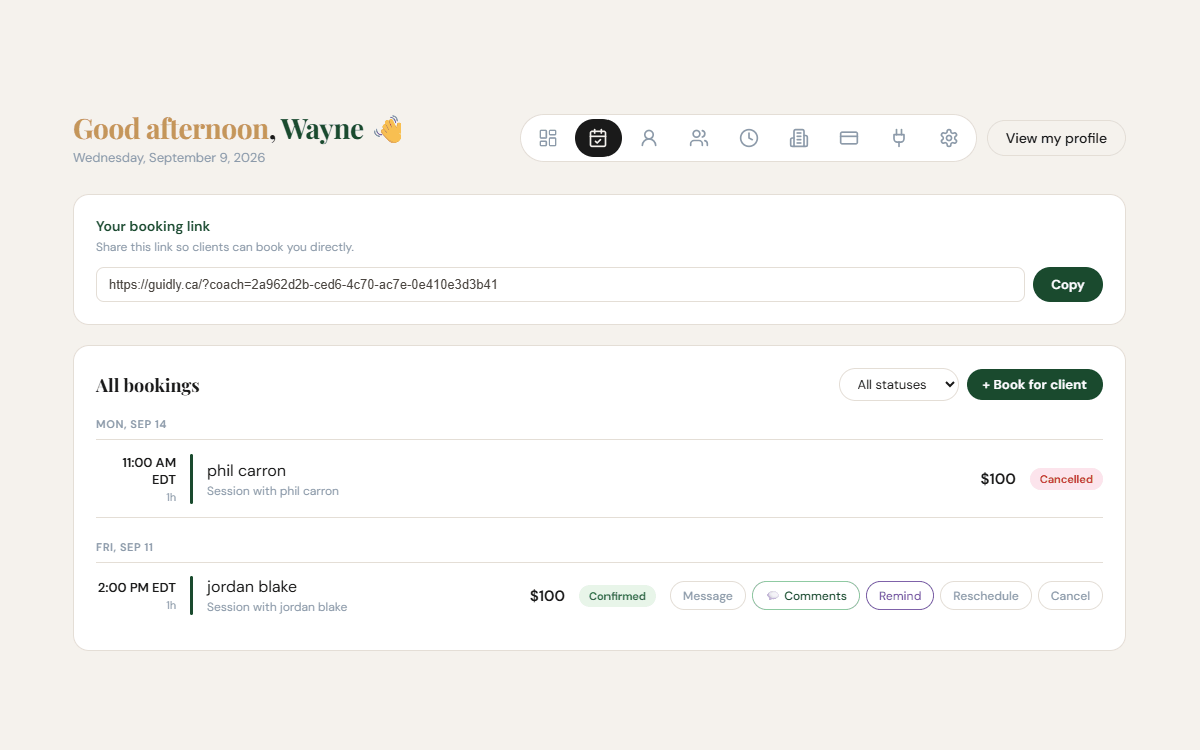
Clients pick a time from your live availability and pay at booking through Stripe, straight to your account. You both get instant confirmation and a calendar invite.
Everything runs itself
Automatic email and SMS reminders cut no-shows. Sessions land on your calendar with the video link attached. Keep notes and add comments to any booking, before or after.
For your clients
Booking with you takes under a minute — no app, no account required.
Find your provider
Open your provider's booking link or find them in the Guidly marketplace.
Pick a time
See real, up-to-date availability and choose the slot that works for you — times adjust to your timezone automatically.
Book and pay
Confirm your session and pay securely if it's a paid booking. You get a confirmation and calendar invite right away.
Show up
Get reminders by email and text, with the video link ready for online sessions. No accounts to juggle.
Connecting Microsoft Teams
Give every confirmed online session its own Teams meeting link. On Pro, the same connection also keeps your Outlook calendar and Guidly in step.
Connect your account
In Guidly, open Settings → Integrations → Microsoft Teams & Calendar and click Connect Microsoft Teams. Sign in with your Microsoft 365 work or school account and accept the permissions.
Offer it to clients
Tick Microsoft Teams as a way you meet, on your session types or in your meeting modes. When a booking is confirmed, Guidly creates the meeting and the join link goes out in the client's confirmation and reminders.
Your Outlook calendar
On Pro, Guidly bookings appear in your Outlook calendar, and your Outlook events block those times on your booking page.
What you need
A Microsoft 365 work or school account whose licence includes Teams. Personal accounts (outlook.com, hotmail.com) can't create Teams meetings, and neither can a work account without a Teams licence — an expired trial is the usual cause. Guidly checks with Microsoft when you connect and tells you on the Teams card if meetings can't be created.
If your company manages Microsoft 365
Some organisations only let an administrator approve new apps. If Microsoft says you need admin approval, send that request to your IT admin, then connect again once they approve Guidly.
Disconnecting
Settings → Integrations → Disconnect. Guidly stops creating Teams links for new bookings and stops syncing your Outlook calendar.
Connecting HubSpot
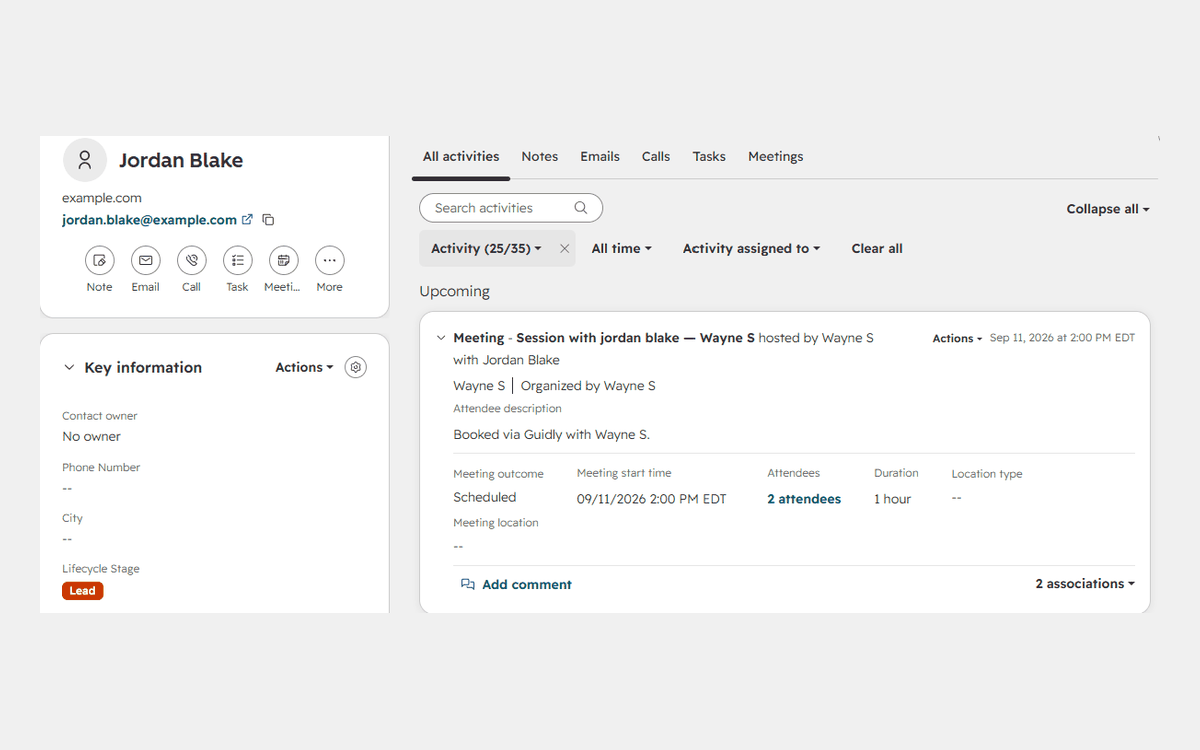
If you run your practice on HubSpot, Guidly keeps it up to date for you. Every confirmed booking adds the client as a contact and logs the session on their timeline, assigned to the provider who ran it — so your CRM reflects what actually happened without anyone typing it in twice. Setup takes about a minute.
Connect your portal
In Guidly, open Settings → Integrations and find the HubSpot CRM panel. Click Connect HubSpot, pick the HubSpot account you want to sync into, and approve the permissions it asks for — reading and writing contacts, and reading the users in your portal so sessions can be assigned to the right one. You land back in Guidly with HubSpot connected. CRM sync is included with Guidly Pro.
Your client becomes a contact
As soon as a booking is confirmed, Guidly looks for a HubSpot contact with that client's email address. If one already exists it is used as it stands — Guidly never overwrites details you keep in HubSpot. If there isn't one, a contact is created with the client's name and email.
The session lands on their timeline
The booking is logged as a meeting on that contact: session title, start and end time, the video link or the address, and a line saying it was booked through Guidly. The outcome starts as Scheduled.
It's assigned to the provider who ran it
Guidly matches the provider's email address to a user in your HubSpot portal and assigns the meeting to them, so a shared portal still reads correctly — you can see at a glance whose client this was. If that provider isn't a user in the portal there is nobody to assign it to, so their name is written into the meeting notes instead.
It stays current on its own
Reschedule a session in Guidly and the meeting moves with it. Cancel it and the outcome becomes Canceled. Comments you or your client add before or after the session appear in the meeting notes, and if the session was recorded on Zoom, the summary or transcript is added and the meeting is marked Completed.
Teams
If you own a team in Guidly, connecting links the whole team — every provider on it syncs into the same portal, and each session is assigned to whoever delivered it. Your providers don't have to connect anything themselves.
Disconnecting
Settings → Integrations → Disconnect. Guidly stops writing to HubSpot straight away. Contacts and meetings already there stay exactly as they are — nothing is deleted. If you're a provider on someone else's team, disconnecting removes only your own connection, not the team's.
What it doesn't do
The sync runs one way. Nothing in HubSpot changes anything in Guidly, contact details you already have are never overwritten, and Guidly doesn't create or read deals, tickets or companies.
Stuck, or want something the sync doesn't cover yet? Email support@guidly.ca or see the support page.
Everything in one place
Online booking, Google Calendar sync, Zoom and Microsoft Teams video, Stripe payments, client management, HubSpot CRM, Zapier, and automatic reminders — so you're not stitching together five tools to run your practice.